Friday, December 8, 2023

Daniel Morel ACTM 3355: Extra Credit - Grasshopper Tutorial (Voronoi and Weaverbird)


Inspiration

After recently telling a friend about the Japanese art of Kintsugi (repairing broken ceramics with gold), and playing with the Voronoi pattern for the lamp project, I looked into tutorials that seemed like they would let me play with both ideas for some home decor. The first tutorial I found on the YouTube channel "Architutors" goes through the process of creating a Voronoi pattern and using the Weaverbird plug-in. These led to interesting designs but were more along the lines of wall art when I spotted this follow-up video.


Using what I'd learned in class and from the first video, I found it fairly easy to set up and work with as I  went about creating a little stand I could use for my keys and wallet when I got home. While setup went easy, getting the actual model fine-tuned proved to be the hard part as, once baked, the model was a mix of meshes, open, and closed polysurfaces. I ended up deep-diving the documentation to find commands like "SelMesh" and " RemoveAllNakedMicroEdges" to help me get things cleaned up much faster than going through piece by piece. After that a few final adjustments I landed on a I was happy with.


These tutorials not only strengthened my skills in Grasshopper but also helped speed up my overall Rhino workflow with all the new tools I found while troubleshooting things. Not only can I create some cool-looking Voronois but I learned how to make geometry-dense models much easier to work with along with the different selection commands and lots of conversions from one geometry type to another. These new skills and tools will help me get better and better as I continue to use Rhino and design cool stuff for myself and my friends.


Michael Murphy ATCM 3355: Extra Credit - Analysis and Modeling

One thing I learned about from the Rhino course about analysis and modeling techniques on LinkedIn Learning is that there is a tool known as the Environment map. It can be found through the analyze tab which leads to the surface option that has the map. This map can change the appearance of an object or shape in rhino with different features like sunset, sunroom, gold, or silver. Sometimes a reflective surface can appear that shows an image, such as a city. An example I did was when I made a robot that looked golden. 


Grace Kang ATCM 3355: Architectonic Lamp Project


Concept:

The concept I was going for was one of those tinted panes of window art. I was inspired by the night sky with the moon and stars, hence why my project is called “Starry Night”.

Process:

I first went into maker case to pick a template and I chose to do the pentagon shaped lantern. The reason being that I wanted to do something different compared to the rest of the class and to challenge myself. I decided to go with a starry night design because of the difficulty of shapes and trying to work with a script on grasshopper that would let me do that. I used a grasshopper script to create the stars and then used rhino to create the crescent moon shape. The process for this project was lengthy and I struggled a bit to completely understand how to do it. However, I was able to figure out the steps for laser cutting and how to improve my design.

Materials:

The materials I used for the keyshot rendering are oak, and the real material I used for the lamp is quarter of an inch of plywood. Learning about the laser cutting process and how the machine shop takes orders was very informative. I thought it was really interesting that computer modeling also involved laser cutting and not just 3d printing. 


Wednesday, December 6, 2023

Project 5- Prosthetic Accessory- Bracelet

 Concept

For this project, I wanted to focus on modeling some sort of bracelet. As an artist with an abstract mind and artistic style, I wanted to sculpt a piece of jewelry with the user's unique contours of their wrist in mind and as a focus for this piece. In many ways, it inspires from futuristic jewelry which is customizable and able to fit perfectly to the user's body contours to ensure a perfect fit. I envision elements on my wristband being futuristic transponders or receivers of some kind; maybe even some sci-fi teleportation wristband.

Rhino Model (Ghosted)

Process

To complete this project, I first projected some curves onto the arm from the side perspective window within Rhino where I used the Project command to project my curves onto the surface of the arm. After that, I rebuilt my curves and created a nice closed-poly surface with my rebuilt curves, and from there I continued to sculpt and refine the shape and contours of my model. I utilized Grasshopper within Rhino to divide my initial curves and create spheres that circumscribe the wristband. I played around with the number of balls until I was satisfied, and joined them with the wristband geometry within Rhino. Lastly, I projected another curve onto the wristband itself and then used the split command to trim out my desired piece of the wristband and lastly lofted the curves back together. 

Rhino Model (Colored)

Rhino Model (Orthographic)

Materials

When considering materials for this project, I wanted to choose something that fits with the futuristic and abstract theme of my design so within Keyshot, I rendered my bracelet using a gun-metal material for the wristband to show the robustness and sleekness of the design. As for the orbs, I wanted to use a material that would give off some sense of awe or spectacle so I chose to represent them using a cool purple gem-stone material. In any case, whether this prosthetic accessory is some futuristic bracelet with special features and made of exotic materials or simply an abstract piece of jewelry, the design is solid and I am satisfied. 


Keyshot Rendering #1


Keyshot Rendering #2

Tuesday, December 5, 2023

Parametric Hexagon Panel

In exploring parametric Grasshopper tutorials online, I found this interesting tutorial detailing how to create a parametric hexagon panel. The tutorial details how to create entirely within Grasshopper a parametric hexagon panel which can be manipulated in many interesting ways and I found it particularly intriguing as it could be applied to many real-world applications like the following, including examples found in nature. 


Link to Grasshopper Tutorial

In following the tutorial, it wasn't necessarily easy but I was able to follow along pretty well and understand what was happening pretty adequately. In many ways the tutorial built upon many elements I learned from the LinkedIn Learning tutorials so I already knew some knowledge about paneling within Grasshopper. After watching and following along with the tutorial I modeled my own hexagon panel with varying heights to add complexity to the parametric design, as described in the video tutorial. 

The Grasshopper script itself is fairly simple in that it generates a grid of hexagons that can be manipulated in size, extent, etc, and then using cull-list component and flip matrix, it allows the hexagons to not overlap and instead align themselves cleanly up again one another. Lastly, to add complexity, using a random component and construct-domain component, we can randomize the heights of the generated hexagon panel to create the final model design. This design can be further worked with in many ways and utilized in many applications. 

Rhino Model (Ghosted)

Grasshopper Script

Rhino Model (Arctic)

Overall this tutorial further strengthened my Grasshopper skills and deepened my toolbox of knowledge within the software. I now know how to better create parametric designs in Grasshopper, particularly concerning how to construct a parametric design that can be easily manipulated and incorporated into many different applications. In the particular case of this tutorial, I better understand how the series component can be utilized to construct a better and more flexible parametric design. I also learned many new concepts in this tutorial which I anticipate I will further explore and utilize in the future. 

Keyshot Rendering


3-d printed model


Parametric Vase

 In continuing to explore Grasshopper tutorials online, I found a cool tutorial that details how to create a completely parametric vase model using Grasshopper which I found very interesting. The script itself is much more complex than what I have been doing within Grasshopper recently and was quite a challenge to follow and understand. This was partly because the output geometry ends up being an open mesh which I am not familiar with working with as much as NURBS surfaces. In the end, I was able to use the offset mesh command in Rhino to give the vase some dimensionality, and the overall form ended up being quite aesthetic. 

Link to Grasshopper Tutorial

Rhino Model (Ghosted)

Grasshopper Script

Rhino Model (Arctic)

Overall this tutorial was immensely useful and informative. I have steered away from working with mesh surfaces in the past but this tutorial showed me how it can still be an effective modeling workflow technique. Additionally, I exposed myself to new concepts and components within Grasshopper that will continue to strengthen my modeling work going forward. Lastly, I can see myself playing around with this script further as it can be manipulated to great degrees and implemented into many different things.

Keyshot Rendering


Amy Huang: Project 5 - Prosthetic Accessory ATCM 3355.001


CONCEPT:


Hu Li Jing
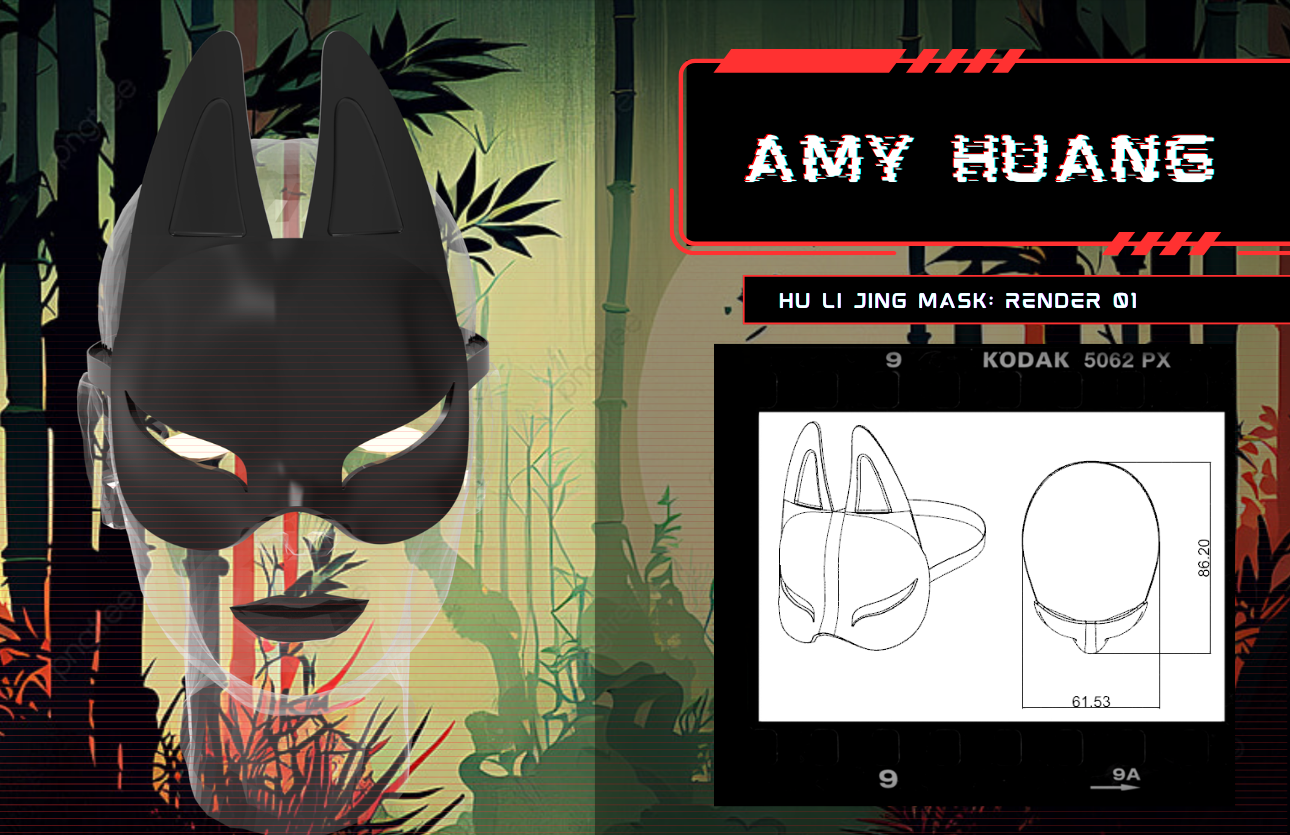
My prosthetic is inspired by Hu Li Jing, an ancient Chinese fox demon that resides within deep dark forests. Based on Chinese fox masks with an alteration to the traditional shape to make it more sleek and modern, this mask is meant to give the wearer night vision just like the legendary Fox spirits. 

Reference Mask

Process:

Ghosted Black

Ghosted Color


The first thing I did was create the outline and profile of the mask with curves. I then projected it onto the female head model and rebuilt and patched the curves until it fit perfectly onto the face. I then traced and projected the shape of the eye slits onto the mask. After tracing the ears, I connected them to the mask and mirrored them to the other side, after which I boolean unioned all of it together and performed a surface offset on all of it. 

Materials:

For the materials, I went with a sleek and modern black marble for the mask. If I were to 3d print it I would hand paint all of the designs onto the mask in gold and red, similar to the reference image.