Showing posts with label Pepakura. Show all posts

Sunday, November 28, 2021

Clay Purdy Week 12: Pepakura Creature


Concept: For my creature I combined a snow leopard and a horned owl to create an Owl Griffin. I like the beefy sturdy legs and thick tail that snow leopards have and wanted to incorporate that into my design. I also took inspiration from this old ceramic black panther sculpture my grandmother has in her house, I've always liked the fluidity of the piece and wanted to try and imitate it.

Techniques: I sculpted the model in Mudbox. I made the head, body, legs and tail separately, each starting out as spheres. I mirrored the front legs, then slightly altered one using the freeze tool to mask off areas on the part then the grab tool to change its pose, I did the same thing for the back legs. In Rhino, I boolean union-ed all the parts together then used the reduce mesh tool in Maya to fine tone the low poly look.

Materials: In Keyshot, I used a rough textured metal material. I used the curvature texture on top of that to add the highlights on the high points or "positive curves" of the model. I wanted to piece to looked like a buffed back, patinated bronze. I think the piece has a very brutalistic style to it, so I set it in an open, grey industrial wear house.


For our actual piece, my group chose Hunter's Duckaroo. We found that the piece had a clean design and came off as very displayable with its three points of contact base. We also found the piece to be really funny looking and thought it would be cool to see it on a large scale.

Hunter modeled the piece and both Zach and Hunter worked on getting ready for and running through the laser cutter. We all came together to assemble the separate larger pieces using loctite. I took those larger pieces home and worked on the larger assembly, post processing and surface application. 

During the building process, we filled the tail, feet and legs with expanding insulation foam to give the piece more stability. To finish the piece, I coated the entire thing in masking tape, starting with the edges then filling in the wholes. I did this to seal the cardboard and also create texture with the folds and wrinkles in the tape. Once the pieces were sealed, I coated them in a black spray on primer to prep the surface to be painted with acrylic paint and to seal it even further. After that, I applied a dark green base layer of paint and started to assemble the lager pieces into one. A challenge arose at this point with the larger pieces not quite fitting together perfectly. All the different little flaps being glued together just slightly off allowed for enough variance in shape on the larger scale creating gaps between pieces. I managed to cover the gaps using tape though. I used multiple layers of paint, varying in tint and hue, to give the surface more depth. To finish it off, I used metalic gold paint and a dry brush technique to hit the high points of the surfaces to give it a buffed, patinated bronze look.


Ammer Abdulkadir week#12 Pepekura final project


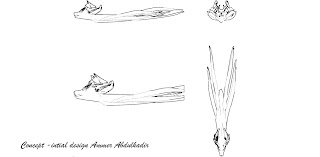
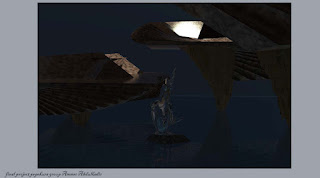
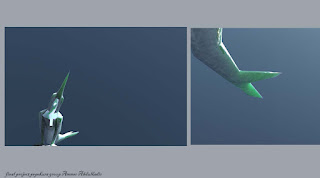
Concept: The concept of the  design is the following; a deer  head like creature with slender  body of a squid. This creature has no  legs  and the tails are also prehensile like trunk of an elephant. 


Process: 

The head of my creature was created on a mobile 3d modeling program called nomad after which I used a program called blender to add or modify the detail of the head. The next step was to create a body for the creature. The neck was created in the rhino program using cylinder command. The second command that was implemented was the bend command. The command that was used was called stretch. The body was made using a combination of a ellipse, stretch, and scale. The tentacles were made using the tube command and the bend command. The mirror command was used to mirror the arms to the other half.


Materials: 
 In the keyshot the material that was chose was material   human skin with  the 
 light blue shade  as a surface and a yellow hue with a texture all applied in all category.


The title of the sculpture is called the Merman of the trinity river. The merman was made by Paris and was chosen because of easily identifiable theme(aquatic), natural posture of the merman, as well as the overall look of the design choices that could be applied to the materials.

.

For the final project, I was responsible for prepping the Pepakura file and getting ready for  the rhino laser formatting. Paris was the person responsible for the model as well as construction in the post production. Xochitl was responsible for laser cutting the piece from the inkscape svg files that she worked on and for the assembly of the model with Paris.  All member of the group  participated in the removal, folding, and for double checking the pieces.


During the process I encountered some issues with the model which resulted in the production of a sum of small pieces. I also tried to cut the pieces in a way that would yield a larger piece. My other attempt included the conversion of  the obj to stl format to use a website called 3dless to reduces polygon faces/detail. The end result would cause the loss of detail to an unacceptable level. With the help of Paris, the model could be reduced to allow for better cuts in the Pepekura program.  The final product piece count was reduced from 170-180 pieces to just   61 parts.  


Hunter Smitherman: Week 12 Pepakura Creature

Individual Portion:

Concept:

    The concept for this final project was based on the prompt of creating a unique creature to build with the pepakura technique at a 3-foot scale. To create a unique creature I first researched some bi-pedal animals, because I wanted something that could stand. I found interest in the unique characteristics of a kangaroo and decided I wanted to pair this animal with a small animal with similarly interesting characteristics. I researched more and found a picture of a duck and thought that the head and neck would fit perfectly onto a kangaroo's body. I then drew my concept, mixing the two animals and starting modeling within Autodesk Maya.


Techniques:

    I brought my concept drawings into Autodesk Maya and began modeling my pepakura creature. I first began modeling with a simple primitive cylinder and began extruding this cylinder at the beak of the creature. I worked my way down the drawing making sure to model the whole body and then come back to model the limbs. When working on the bottom of the creature I wanted to include a tail similar to that of a duck, but also use this tail as standing support so that the sculpture has 3 points of contact with the floor. I kept myself aware of the low-poly style that was required in the assignment and made sure to not include too many details that would not be visible in the final sculpture. I next modeled the legs and arms and also used a cylinder and extruded the feet, legs, and thighs of the creature. I made the hands and arms of the creature thin to resemble some of the reference imagery I had. After modeling the limbs of the creature I used Boolean Union to combine all the parts to create my creature. I used the multi-cut tool to fix some of the polygons so the final pepakura sculpture would fold properly. I also used the Mesh > Reduce command to cut the polygon count to a usable amount.

    My class used the Pepakura Designer Application to slice our 3D models into vector layouts to laser cut our projects from thin cardboard. This Pepakura Application allowed us to slice our 3D models and had an interface where we could lay out the cut slices on certain sizes of boxes. I found this application very easy to use and the best way to cut my model was to slice it into rings.


Materials:

    After modeling and slicing my pepakura creature, I used the 3D model of my creature in Keyshot to give a representation of my ideas for the real-life sculpture. I decided to use a grass texture to give the creature "hair" and I colored this texture a brownish color to match my reference imagery. I also wanted to give the creature a different material on the beak to make it look more duck-like. I also used this beak material for the front of the feet and the hands and created a darker-colored grass material for the tail. For the lighting, I used the environmental lighting and positioned the light where and how bright I wanted it. For the environment image, I placed the creature in a deserted type area as I felt that's the most logical place this kind of creature would be in.  


Group Portion:

    My group was comprised of myself, Zachary Alameri, and Clay Purdy. The group discussed after we all finished our 3D models and we chose my design to build with pepakura. The sculpture is called "Duckaroo" because it's a combination of a Duck and a Kangaroo. This model was chosen due to the simple and low-polygonal structure of the model, the practicality of build time and post-processing, and the uniqueness of the creature's characteristics. 

    The duties of each member were divided up by each individual's expertise within the pipeline of creating this pepakura sculpture. I was involved in the process of the 3D model, Pepakura Designer, and Laser Cutting of this creature. I tweaked the 3D model to provide a workable and properly folding pepakura creature. I sliced the model using the Pepakura Designer and made sure the flaps had the correct orientation and included the edge id's to identify which edges line up. I also was taught how to format and cut the vector layouts with the laser machine at TheLab.ms Makerspace by Doug Emes. 

    When tweaking the 3D model, it was hard to fix everything wrong with the model in a single pass and I found myself constantly switching from Pepakura Designer back to Maya to fix any polygons that would otherwise be unusable. When attempting to cut this project it was very hard to find the time when the laser machine would be free of other classmates. The laser was simple to figure out and the correct settings to cut the cardboard were a little hard to find at first. The build portion when mostly well, with a couple bad flaps and tightly fitting pieces. 


    I also decided to 3D print this model to have a glimpse of what the final product would look like. This was one of my first ever 3D prints and I'm glad I was able to successfully bring this Duckaroo to life.


Xochitl Juarez: Week 12 Pepakura Creature

 Concept

    For my initial creature design, I wanted to try and combine various animals. The animals that I decided to combine were a sun bear, an axolotl, and a flamingo. Each had different characteristics taken from them, such as the bear’s body, the flamingo’s neck, and the tail and whiskers of the axolotl. I wanted to combine these animals as I mainly wanted to create a lizard mammal hybrid. The main changes that were made while creating the concept were if more bird features should be added, such as a beak and wings. I ultimately decided against it as I did not want to make the design too cluttered or confusing. For the color scheme and texture, I wanted to stick with the mammal features of fur, attempting to simulate the texture with the renders. I also decided to make the color scheme red as I wanted the creature to stand out and seem less aquatic.


Techniques

    I started on the head of the creature with a quad ball that was created by using the Smooth function on a cube twice. Next, I pulled on individual vertices to create a slightly squished head. Then, I created the eye sockets by using Extrude on the socket faces, pushing them inwards. I also extruded the front mouth faces to create the mouth fold, adjusting the vertices as needed. Once the head’s base was complete, I started work on the neck. Using a cylinder and a NURBS curve, I positioned the curve’s points to create the arch of the neck. I then positioned the bottom faces of the cylinder to the top of the curve, extruding them and adding sections to create a more seamless neck. Once the neck was complete, I created a new quad ball from a cube to start the body. I stretched the ball and pulled the vertices as needed to create an oval-like shape that would be tall enough to hold the legs and tail. With the body set, I started creating the legs. Using a cylinder, I added edge loops with the Insert Edge Loop tool and pulled the loops to create the bends of the legs. The feet were made by starting with a cube that I added subdivisions to through the input settings in the Channel Box. I duplicated one of the legs and applied the second leg to the back of the body to prepare to attach the body together. To make attaching easier, I first deleted half of the model, leaving only the left side to work with. Next, I deleted faces that would be used to attach the head to the neck. I made sure to have the same number of edges on each section to then use the Bridge tool. With it, I was able to create additional faces that connected the head and neck. To ensure the connection was smooth, I used the Smooth Preview feature to see the connection. I moved vertices and spaced out the edge loops to avoid lumps. This same process was used to attach the two legs. However, extra edge loops were added to avoid excessive pulling. Once the attachments were complete, I returned to the head. Using a cylinder and NURBS curve again, I created the antenna that would hang from the sides of the face. The attachment process was the same as the rest of the body. Some of the edge loops of the head had to be changed as the antennas were so small that the head would be lumpy with so many edge loops placed together. Once the antennas were attached, I set the center pivot to the center of the model when whole. Any vertices that were unaligned were adjusted. To be sure of having few problems occurring, I froze the transformations and deleted the model’s history. Next, I duplicated and flipped the model’s half and connected it by using the Combine tool on the halves of the model and the Merge tool on the vertices. With the main body complete, I extruded some of the back faces with a NURBS curve to create the shape of the tail. The final cleanup of the model was done with freeze transformations, delete history, and mesh cleanup of nonmanifold geometry.


Materials

    The main colors and textures were made by using Substance Painter. Within keyshot, I used a default hard plastic material to apply my own texture maps. Next, I changed the type to generic, making the roughness 0.385 and the specularity 0.302. The texture maps were applied as color and bump maps, each constraining to the model by following the UVs. For the basic renders, I used the product lighting preset and a grey lighting setup. For the environment render, I used an art gallery as the backdrop as the sculpture would be displayed in a proper setting. If my design was chosen, I would have liked to achieve the fur texture with the use of paper mache and clay. The base color would be spray-painted on while the patches of darker areas would be painted on afterward. The eyes would have been painted with metallic paint so that they would be reflective and stand out.


Group Design Choice

    Of my group, the design that was chosen of the three was Paris’ merman design. We decided to name the sculpture The Merman of Trinity River. The reason that we decided to choose the design was that it seemed to be the most flexible for post-processing purposes as to what designs, colors, and textures could be created. The design also lends itself to having a more fun tone that played upon the expectations of the ideal image of a mermaid. We were also able to tell a story through the sculpture the most directly with this model in comparison to the other options.


Group and Individual Roles and Expectations

    For work to be distributed as evenly as possible and to work around any time constraints or transportation issues, Ammer was made responsible for preparing the model for pepakura and the laser cutting within Rhino. As the model belonged to Paris, he and Ammer cleaned up and simplified the model to make the pepakura file preparation easier. Once the file was prepped, I transitioned the file to Inkscape as SVG formats to comply with the laser cutter’s format. In addition, I was the one who input the file and ran the laser cutter while both Ammer and Paris checked the pieces and removed them from the cardboard. Between the three of us, we folded the pieces and made sure the pieces were accounted for. With the laser cutting complete, Paris and I assembled and applied post-processing to the model and the model’s base. 


Process and Contributions to Group Work

    The model was first cleaned up and made to have as few faces as possible, done by Ammer and Paris. Once a good footing was found with the model, Ammer and Paris collaborated on making the pepakura file have as many large pieces as possible to make assembly easier. When a version of the file was complete, I would check the file and check for any pieces that seemed to make little sense for physical construction. Once complete, Ammer made the Rhino file that contained the pepakura file. With the Rhino file, I made the perforations needed for the cuts and converted the Rhino into “sheets” of SVGs for the laser cutter.

    Once file preparation was completed, we met together at the maker space to cut the pieces out. I ran the machine and monitored the cuts, giving Ammer and Paris the cut sheets once they were complete to check for any pieces that were cut incorrectly or were unusable. Once the laser cutting was complete, the three of us folded the pieces and did a final inventory check on the pieces.

    With the pieces completed, Paris and I assembled the model with the use of masking tape and loctite. As some of the pieces ended up tugging on each other, the loctite would occasionally snap off, requiring tape to be the main method of assembly. Another issue that was encountered was that due to the twisted pose of the model, certain pieces were not able to attach as seamlessly. This was mainly an issue for one of the arms as it was partially within the chest. Despite minor issues with assembly, the model was able to stand on its own as it has three points of contact with the ground: the two arms and a portion of the tail.

    The direction for the post-processing was decided to try to have a gradient look between the tail and body, accomplished through spray paint. Illustrations were added to the tail to act as ‘tattoos’ of what happened for our creature to look the way that he does. To add to the macabre appearance of the merman, we decided to use the contours of the eye socket to add multiple eyes to the creature. In addition, clay coral, barnacles, and shells were added to the body alongside seaweed, with inspiration being taken from fish and whales who are covered in a variety of marine life.

    Overall, the model and the assembly were able to be completed in a timely manner. If there would be any changes that could be made, I would have liked to have added a layer of paper mache to smooth out the sculpture’s surface. This was originally taken into consideration but was ultimately decided against in order to have time to complete the sculpture and whether the cardboard would be able to handle being soggy and hold shape. Clay could have been used as an alternative, but its fragility and long drying times also made it a poor choice for full-body application.