Showing posts with label ducky. Show all posts

Sunday, September 11, 2016

Michael Crow: Week 2 Ducky


Concept: I really liked the idea of a basic rubbery ducky sold to rich upper crust children. one where kids could have a ducky dressed in a tux, but of course that means that he cant be a bath toy, so extrapolating that he couldn't be a bath toy anymore so I changed his material to a harder plastic for everyday play.

Modeling Techniques: Following the tutorial i continued using "Project" to create curves on my duck to make the layers of clothing and the layers for the hat and the cane. The monocle comes form basic shapes. and the duck tails i used for the overcoat came from subtracting a square form the body of the duck. Due to this I was unable to have all closed edges, but that wasn't a requirement for this project, so oh well.


Materials Used in Concept: I wanted to stick as close to the original duck idea as possible so i stuck with rubber and plastics, making it a harder plastic since it would be a small child's toy. I wanted it to last a long time. the colors mimic that of a Tux mixed with the colors of a rubber ducky. The monocle is made of glass and gold. Making the duck a much more expensive toy and fulfilling its purpose as a toy for the rich elites.

Muhammad Martinez: Week 2 Ducky

Ghosted black

Ghosted with colored layers

Keyshot with material - bird's eye

Keyshot with material - ant's eye

Concept
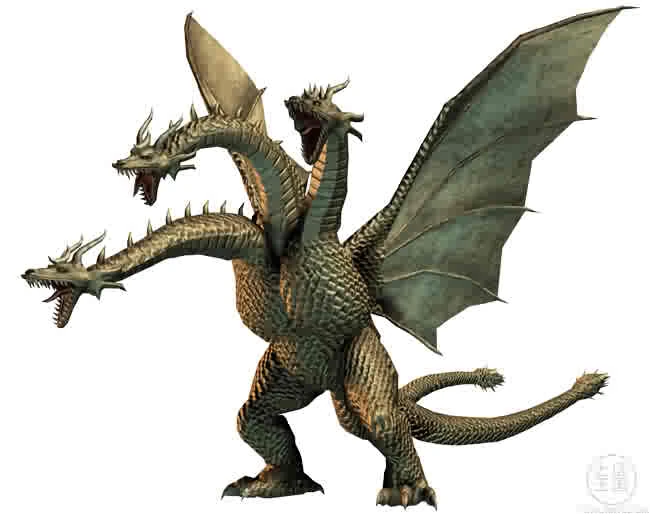
With ferocity only matched by King Ghidorah himself, this terrifying trio transforms the rubber ducky into a force to be reckoned with. These guys can proudly join the ranks alongside other three-headed avians.

Model Techniques
I continously rebuilt the body with different points while teasing it into shape. The shape of the bills were drawn out in the right viewport then projected onto the heads. Commands like Join, Explode, Blend, Patch, and EdgeSrf were needed remove the naked edges formed between the head, bill, and neck.

Materials
Colored plastics were used for the body and heads of the model.Colored stainless steel is used for the bills along with precious metals for the eyes (gold and platinum).

Sunday, January 31, 2016

Christopher Rickett: Week 2 - Duck


Concept: For this duck model I found myself looking at the rubber duck collection that my roommate has and found that he didn’t have one that looked like a punk duck. I thought it would be fun to create something like that.


Technique:  I used the Select Points Tool to stretch spheres into the basic shapes.  I used curves to split the wings and the beak away from the body and head.  The Blend Surface tool was used to merge the head to the body, as well as connect the wings back to the body to give it a smoother molded shape to the wings.  The Bend tool was used to create angry looking eyebrows.


Materials:  All of the materials used were intended to give it the appearance of a true rubber duck. The Spikes on the head are colored green to best contrast with red of the body. The only material not used in this way was a gold colored nickel material that was applied to the ring that hangs from the tip of the beak.

Monday, February 2, 2015

Jake Lenzen: Week 3 Ducky

For this model I wanted to create the perfect rubber ducky toy. I followed to tutorial to create the organic structure, trying to keep the proportions close to what I thought would appear normal. The ducky didn't have as much class as I would have liked however, so I added a top hat as a finishing touch.

The duck was created with 2 spheres which were rebuilt. The spheres were then squashed and stretched using control points. I used a curve to project onto the head and body to create holes for the neck. I then blended the two curves together to create the neck itself. The top hat was made using simple cylinders, both for the hat and the band.

For materials I used the closest I could find to yellow rubber for the body, with a similar black material for the eyes. The top hat used a cloth material, both for the band and the hat.


Chloe Ferris: Week 3 Ducky

This ducky was my favorite modeling project from this assignment, and it was a lot of fun to tackle. I followed the Rhino tutorial for the ducky pretty closely, but I was really pleased with the result, and didn't want to change too much more about it. It is based off of a traditional toy duck, however with slightly bigger (and goofier) eyes, a plump body, and a thin, proud beak.


The ducky's base was made with two spheres, one for the head and one for the body. These spheres were then modified, and the control points were pulled around in order to create the organic shapes that show off the silhouette of a classic ducky toy. A curve was drawn and then projected onto the head in order to separate the bill from the head so that it could be colored differently when rendering. This method was also used to cut the tail into a separate object for coloration as well.


Originally I was going to go with a traditional, plastic ducky, but when I was messing around with the different materials, I accidentally dropped a gemstone material on the body and ended up really liking the result! I kept the blue gemstone for the body, and added an orange-rust colored gemstone to the bill and tail, to break up the color a bit. Because of the way the light reflects and bounces around the stone, it adds a lot of high-contrast shadows, which I liked. I used a very translucent white and black glass for the eyes.


Sunday, February 1, 2015

Jenna Bastian: Week 3 Ducky

I didn't have any conceptual theme at first, I was trying to finish the duck tutorial. However, I did want my duck to have wings so it can fly, so that was my inspiration. I also like Mallard ducks.

I made a curve that outlined the shape of the wings but didn't know how to make a surface out of it, so I made airplane-like wings instead. Later, with the wonderful knowledge of F10 (moving vertices) I tilted them up so won't be so much like an airplane. I used F10 later to adjust other parts of the body.


The duck was originally white with a yellow beak but it was too simple. So then I changed it to nature-like colors: green and brown (still yellow for beak but paler). The type of materials used alternated between plastic and gem, but finally settled down with what I have now. This time I did add ground reflections, and changed the background color a bit. It somehow reminds me of a Mallard duck.

Ghosted images from Rhino and KeyShot renders:

Ghosted in Rhino


Layered in Rhino

Keyshot Render #1
Keyshot Render #2